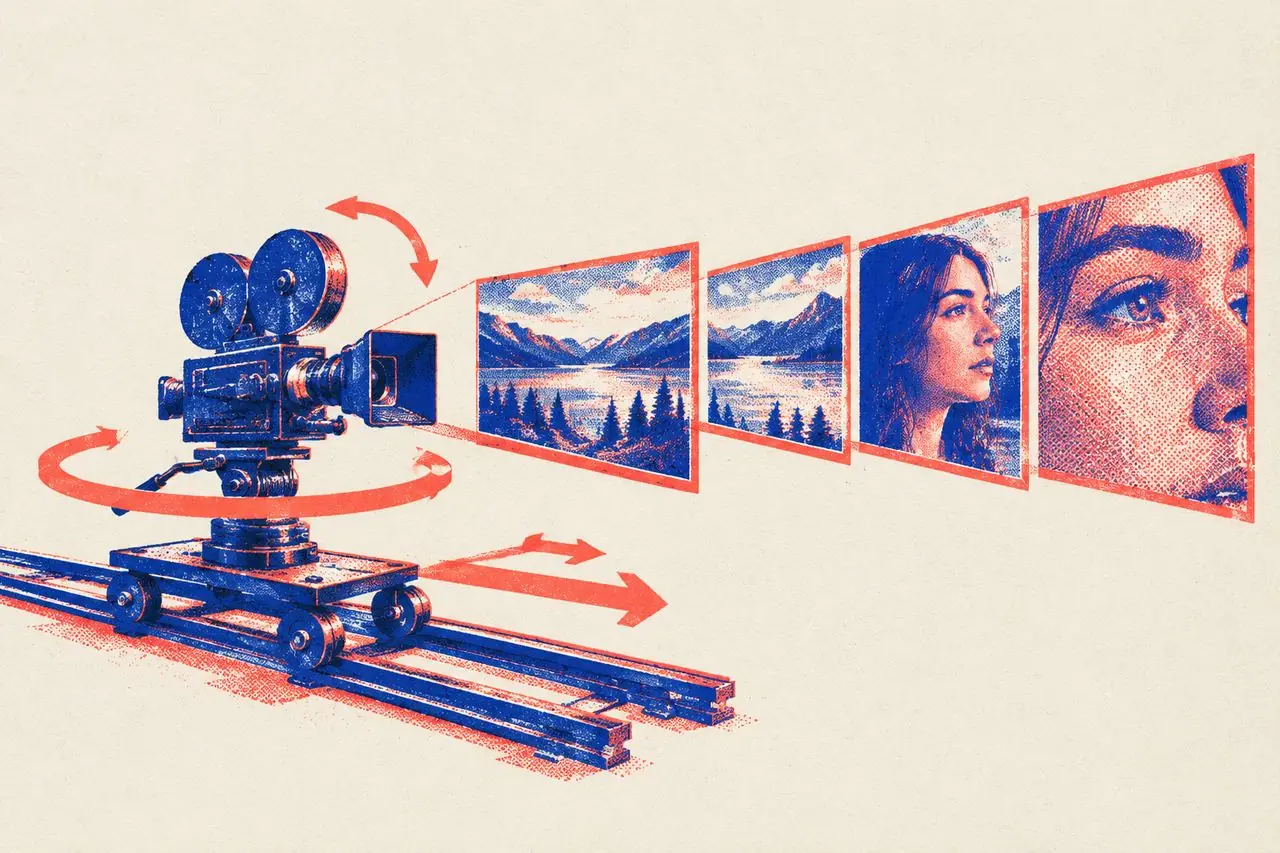
The Complete Guide to Shot Sizes & Camera Movements: 8 Framing Sizes, 12 Moves, Shot-Reverse-Shot & Slow Motion (With AI Video Prompts)
When a video stays locked in the exact same medium shot from the exact same angle from start to finish, viewers might not be able to name what's wrong—they just get bored and swipe away. The reason is simple: shot size and camera movement are the "tone of voice" of your lens. Staying on one framing the whole time is like reading a script in a flat monotone without ever taking a breath. This guide breaks down four things: shot sizes (how much fits in the frame), camera movements (how the lens moves), classic combinations (like shot-reverse-shot and slow motion), and how to write all of these into AI video prompts.
1. The 8 Shot Sizes: Each One Answers a Different Question
| Shot Size | What's in the Frame | The Question It Answers | Typical Use |
|---|---|---|---|
| Extreme Wide Shot (EWS) | Tiny figure, vast environment | "What kind of world is this?" | Setting the mood, epic scale, isolation |
| Wide Shot (WS) | Full body + plenty of surroundings | "Where are they?" | Establishing location and how the character fits into it |
| Full Shot (FS) | Head to toe filling the frame | "What are they doing?" | Full-body movement, outfit showcases, dance |
| Medium Shot (MS) | Knees or waist up | "What's going on between them?" | Two-person dialogue, interaction, everyday storytelling |
| Medium Close-Up (MCU) | Chest up | "What are they saying?" | Talking-head videos, interviews, main dialogue |
| Close-Up (CU) | Shoulders and head | "What are they feeling right now?" | Emotional shifts, pivotal lines |
| Tight Close-Up | Full face or a single object | "How big of a deal is this?" | Peak emotion, key props, product hero details |
| Extreme Close-Up (ECU) | Eyes, corner of the mouth, fingertips, stitching | "What does this tiny detail mean?" | Psychological cues, suspense, craftsmanship |
Three Rules for Switching Shot Sizes
1. The tighter the frame, the stronger the emotion—and the less information you give about the room. A tight close-up magnifies anger or heartbreak tenfold, but the audience can't see where the character is standing. Use wide and medium shots to lay out information; punch into close-ups when the emotion peaks.
2. Changing shot size is your pacing. Cutting straight from a full shot to a close-up is a visual exclamation mark ("Pay attention to this!"). Pulling back from a tight close-up to a wide shot lets the tension exhale. If a conversation is heating up, step the framing inward—Medium → Medium Close-Up → Tight Close-Up—and the pressure builds naturally.
3. Neighboring shots need a clear jump in size. Cutting from a medium shot to another medium shot at nearly the same angle makes the picture look like it hiccuped (a jump cut). Whenever you cut to the next shot, either step at least one shot size closer/further, or swing the camera to a noticeably different angle.
2. The 12 Camera Movements: How Motion Shapes Emotion
| Movement | How the Camera Moves | Emotional Feel / Job | Best Used For |
|---|---|---|---|
| Static | Locked off, zero movement | Objective, grounded, lets the acting carry the scene | Dialogue, talking-head clips, deadpan comedy |
| Push-In (Dolly In) | Moves closer to the subject | Focus, mounting tension, "look right here" | Revealing a key clue, building emotional pressure |
| Pull-Back (Dolly Out) | Moves away from the subject | Reveals context, loneliness, detachment | Endings, twist reveals (pulling back to show where they really are) |
| Pan / Tilt | Tripod stays put; lens rotates left/right or up/down | Scanning the room, following someone's gaze | Showing the space, looking where a character just looked |
| Truck / Crab | Entire camera slides sideways parallel to the action | Flow, walking alongside someone | Gliding past store shelves, pacing beside a walking character |
| Tracking / Follow | Follows a moving subject from behind or ahead | Immersion, urgency | Chases, walking shots, vlogs |
| Crane Up / Pedestal Up | Camera rises vertically | Opening up the world, elevation, seeing the big picture | Closing shots, revealing scale |
| Crane Down / Pedestal Down | Camera lowers vertically | Dropping into the story, grounding the focus | Opening on the sky or treetops and settling onto the character |
| Orbit / Arc | Circles around the subject | 3D depth, hero moment | 360-degree product showcase, dramatic character entrance |
| Handheld | Subtle, uneven natural shake | Raw, tense, documentary realism | Arguments, panic, street footage |
| Whip Pan | Fast sideways snap that blurs the frame | High-energy transition, speed | Snapping between two locations or moments |
| Dolly Zoom (Vertigo) | Camera pulls back while the lens zooms in (or vice versa) | Dizziness, shock, gut-punch realization | The exact second a character realizes the horrifying truth |
Three Rules for Camera Movement
1. Never move the camera without a reason. Why is the lens moving? Because the character started walking (track), because they snapped their head toward the door (pan), or because the letter on the table is crucial (push-in). Unmotivated camera movement just makes viewers dizzy.
2. Stick to one move per shot. Trying to push in, orbit, and crane up all in the same three-second clip turns the frame into soup. Save complex compound moves for one signature hero moment—once or twice per video is plenty.
3. The heavier the acting, the quieter the camera. The most gut-wrenching moments on screen almost always happen in a locked-off static frame or an almost imperceptibly slow push-in. If the camera is flying around the room, it steals attention away from the actor's eyes.
3. Four Classic Combinations
1. Shot-Reverse-Shot: The Bread and Butter of Dialogue
When two people talk or argue, alternating shots between A and B is shot-reverse-shot—usually framed as over-the-shoulder (OTS) shots (shooting A from just behind B's shoulder so the edge of B's head and shoulder stays in the foreground).
Key rules in practice:
- Respect the 180-degree line: Draw an imaginary line connecting the two speakers, and keep your camera on one side of that line for the whole scene. Cross the line by mistake and the cut will make it look like both people suddenly turned to face the exact same direction.
- Equal shot sizes mean equal footing; mismatched sizes show who holds the power: Shoot the dominant character in a slightly low-angle close-up and the cornered character in a slightly high-angle medium shot, and the audience knows who's winning before anyone speaks a word.
- Speed up the cuts as tempers flare: As an argument escalates, trim the shots shorter and shorter (2s → 1s → 0.5s) until you slam to a halt on a tight close-up.
- Reaction shots hit harder than speaking shots: Right after Character A drops a brutal line, cut immediately to Character B's face rather than lingering on A's mouth.
2. Slow Motion (Overcranking): Adding Weight to Peak Moments
Shooting at a high frame rate and playing it back at normal speed stretches time out.
Best moments for slow motion:
- Product hero shots: thick sauce pouring over food, flour dusting the air, water splashing;
- Emotional peaks: a slap landing, a single tear falling, turning away to walk out;
- Physical power: a jump, a punch, flipping hair back.
Keep in mind: Hold slow motion for 1–3 seconds, once or twice in a short video. If the entire clip is in slow motion, nothing feels special—it just feels slow.
3. Insert Shots: Directing Attention and Hiding Cuts
Dropping a quick tight close-up between two main shots—a fist clenching under the table, a wedding ring sitting on the counter, the hands of a clock. Inserts do two jobs at once: they tap the viewer on the shoulder and say "Notice this," and they cleanly cover up continuity jumps in your edit.
4. Point-of-View (POV) Shots: Putting the Viewer Inside the Character's Head
The camera becomes the character's own eyes: looking down at a crumpled letter in their hands, peeking through a cracked door, staring up at a blurry ceiling while waking up. POV shots force the viewer to see the exact same thing the character sees—great for suspense reveals and high-immersion product demos.
4. Sample Shot List for a Short Dialogue Scene (Fictional)
Scenario: A wife discovers her husband secretly quit his job weeks ago.
| # | Shot Size | Movement | What's on Screen | Why It's Shot This Way |
|---|---|---|---|---|
| 1 | Tight Close-Up | Static | A termination letter sitting on the dining table | Hands the audience the information gap right away |
| 2 | Medium Shot | Static | Husband walks through the front door and spots his wife sitting at the table | Establishes the room layout and where both people are |
| 3 | Close-Up (OTS) | Slow Push-In | Wife looks up: "Is there something you want to tell me?" | Pressure starts tightening |
| 4 | Close-Up (OTS) | Static | Husband's eyes drop toward the letter on the table | Let the reaction land |
| 5 | Extreme Close-Up | Static | Husband's fingers tighten around the strap of his briefcase | Insert shot that shows guilt without a word |
| 6 | Close-Up | Subtle Handheld | Husband opens his mouth: "I was going to tell you when—" | Slight camera tremor mirrors his panic |
| 7 | Medium Shot | Pull-Back | Wife stands up and walks to the window with her back to him as the space between them widens | Turns emotional distance into physical space on screen |
5. How to Write Shot Sizes and Camera Moves in AI Video Prompts
When writing prompts for AI video generators, keep your framing and camera move plain, singular, and right at the very beginning of the prompt. Here are the most reliable bilingual phrasings:
Shot Size Prompts
| Shot Size | Chinese Prompt | English Prompt |
|---|---|---|
| Extreme Wide | 大远景,人物在画面中很小 | extreme wide shot, tiny figure in vast landscape |
| Full Shot | 全景,人物全身入画 | full shot, full body in frame |
| Medium Shot | 中景,腰部以上 | medium shot, waist up |
| Close-Up | 近景,肩部以上 | close-up, head and shoulders |
| Tight Close-Up | 特写,面部占满画面 | tight close-up on face |
| Extreme Close-Up | 大特写,只拍眼睛 | extreme close-up of the eyes |
| Over-the-Shoulder | 过肩镜头,前景是 B 的肩膀 | over-the-shoulder shot from behind B |
Camera Movement Prompts
| Movement | Chinese Prompt | English Prompt |
|---|---|---|
| Static | 固定镜头,机位不动 | static shot, locked-off camera |
| Push-In | 镜头缓慢推近人物面部 | slow push-in toward the face |
| Pull-Back | 镜头缓慢后拉,露出周围环境 | slow pull-back revealing the surroundings |
| Truck | 镜头从左向右平移 | camera trucks left to right |
| Tracking | 镜头从背后跟随人物行走 | tracking shot following from behind |
| Orbit | 镜头环绕主体旋转半圈 | camera orbits 180 degrees around the subject |
| Crane Up | 镜头缓缓升高,俯瞰全景 | crane up to a high-angle overview |
| Handheld | 手持拍摄,轻微晃动 | handheld camera, subtle shake |
| Slow Motion | 慢动作,水花缓慢溅起 | slow motion, water splashing in slow motion |
Prompting Tips That Save Credits
1. One camera move per shot. Asking an AI model to "push in while orbiting and craning up" almost always produces a warped, nauseating mess. 2. Name both the start and end framing: Writing "slow push-in from a medium shot to a tight close-up on her face" gives you way more control than just writing "push-in." 3. Always specify the speed: Words like slow, rapid, or sudden tell the model what emotional register you want. 4. Break multi-shot sequences into numbered beats: Label them "Shot 1, Shot 2" or split by timestamps, giving each beat one shot size and one camera move.
6. Post-Shoot / Pre-Export Checklist
1. Does the full video use at least 3 different shot sizes? 2. Do neighboring shots have a clear difference in framing size or angle? 3. Does every camera movement have a clear storytelling reason behind it? 4. Do two-person dialogue scenes stay on one side of the 180-degree line? 5. Are the emotional peaks framed in close-ups or tight close-ups? 6. Did you consider slow motion for the single most important physical beat? 7. Did you drop in an insert close-up to spotlight key props or details?
FAQ
Q: Can I pull off these camera moves shooting on a phone? Easily. Push-ins and pull-backs are just you taking a steady step forward or backward; sideways trucking is sliding your elbows along the edge of a table; and a basic phone gimbal makes tracking and orbiting butter-smooth. Shot size doesn't take any gear at all—it just depends on how close you stand.
Q: My talking-head videos are just me sitting at a desk. How do I keep the visuals from feeling dead? Alternate between two framings (either shoot with two phones at once, or punch in digitally during editing to alternate between a chest-up medium close-up and a tighter close-up on key lines). Whenever you mention an example, cut away for two seconds to an insert close-up of the object you're talking about.
Q: What if the AI video model keeps ignoring my camera movement prompt? Trim down the number of competing actions inside that shot, move the camera instruction to the very first words of the prompt, and generate shorter clips. If you want a complex move, split it into two separate short shots and stitch them together in your editor.
Want to study the shot-size rhythm and camera moves of a video you admire? Run it through VideoLens to see each shot's size, movement and storytelling role, and get reusable shot-by-shot prompts.